
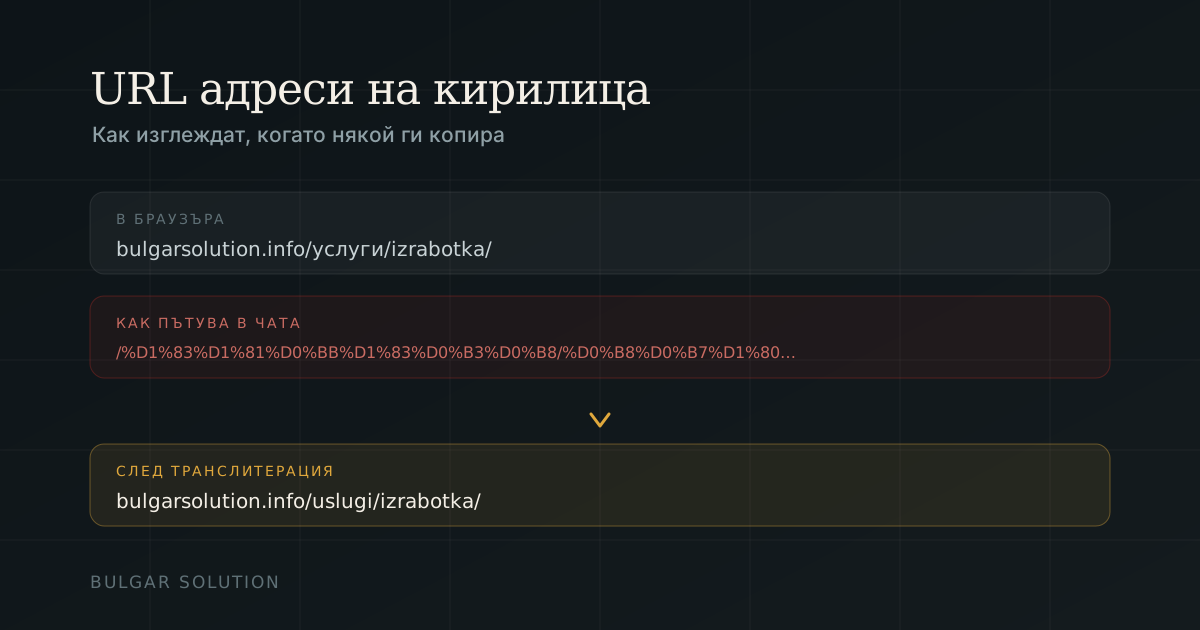
If your site runs on WordPress in Bulgarian, it probably has URLs like /услуги/изработка-на-сайтове/. It looks fine in the browser. The problem only shows when somebody copies it and sends it on.
What is actually happening
URLs allow only a limited set of characters. Everything outside it — all Cyrillic included — is percent-encoded. The tidy /услуги/ travels as /%D1%83%D1%81%D0%BB%D1%83%D0%B3%D0%B8/. Your browser shows it back as Cyrillic, but in an email, a chat, a spreadsheet or a foreign tool the unreadable version is what stays.
- A link shared in Messenger or Viber looks like random characters.
- Some platforms truncate it at a point where it stops working.
- Analytics reports become hard to read.
- Some foreign audit tools handle it incorrectly.
Does it hurt SEO?
Directly, no. Google indexes Cyrillic URLs without trouble and has said for years that it understands them. Indirectly, yes: a URL people cannot share comfortably gets shared less, and shares bring links and traffic. So our advice here is practical rather than dogmatic.
The generator below uses the official Bulgarian transliteration — the same one on ID cards and road signs — so the URL matches what people would write anyway.
Resulting URL
bulgarsolution.info/website-development-for-small-business-in-varna/Examples
tseni-za-seo-optimizatsiashtastlivi-klienti-v-balgariaueb-dizayn-i-poddrazhka
This uses the official Bulgarian transliteration — the same one on ID cards and road signs — so your URL matches how people actually spell these words.
If you already have Cyrillic URLs
Do not change them indiscriminately. Any URL that is indexed or has external links pointing at it carries accumulated value, and changing it throws that away unless it is done properly.
- List the pages that actually bring traffic — Search Console shows them.
- Change only those, and only where the URL is genuinely a problem.
- Add a 301 redirect from every old URL to its new one.
- Update internal links so they do not travel through a redirect.
- Submit the new sitemap and watch for 404s over the following weeks.
Changing a URL without a 301 redirect is the fastest way to lose rankings you spent years building.